Modernise: A Bold Display Font for Creative Projects
Fonts are more than just letters on a page—they’re a powerful design element that can shape the tone, personality, and impact of your work. When it comes to making a statement, Modernise stands out as a premium display font with a sleek, confident vibe. Designed for clarity and visual punch, it brings a modern edge to everything from branding projects to social media graphics. Whether you're crafting a logo or designing an editorial layout, Modernise offers a fresh perspective that’s both stylish and functional.
The Look and Feel of Modernise
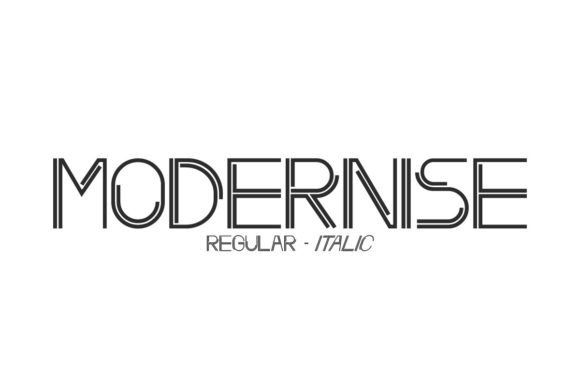
Modernise is a sans serif display typeface that blends geometric precision with subtle organic touches. Its clean lines and open apertures make it easy on the eyes, while the slightly rounded corners and soft contrast between strokes give it a friendly, approachable feel. Unlike many rigid sans serifs, Modernise carries a gentle warmth that prevents it from feeling too cold or corporate.
This font isn’t meant for long paragraphs but shines in short bursts—headlines, taglines, titles, and other attention-grabbing text elements. It has a strong presence without being overpowering, making it versatile enough to suit both minimalist and bold design aesthetics.
One of its standout features is the balance between formality and playfulness. The uppercase letters have a commanding height, which makes them ideal for logos or brand names, while the lowercase characters maintain a smooth rhythm that feels natural in more casual settings like greeting cards or invitations.
Key Visual Characteristics
- Geometric Structure: Offers a crisp, modern foundation that aligns well with contemporary design trends.
- Soft Edges: Adds a touch of elegance and approachability to the otherwise sharp sans serif style.
- High X-Height: Enhances legibility at smaller sizes, though it still works beautifully when scaled up for maximum impact.
- Variety of Weights: Includes multiple styles to support different design needs, from light to extra bold.
Where to Use Modernise Effectively
Because Modernise is a display font, it’s not intended for body text. However, it’s incredibly useful across a wide range of creative applications where visual appeal and brand expression matter most.
In logo design, Modernise adds a layer of sophistication and modernity. It works especially well for startups, lifestyle brands, and digital-first companies aiming to project innovation and clarity. For example, a fitness app might use Modernise in a bold weight for its name to convey energy and forward motion, while a boutique coffee shop could use a lighter version to create a more refined, welcoming look.
When it comes to editorial design, this font can be used to highlight key sections like chapter titles, pull quotes, or section headers. Pairing it with a more traditional serif font for body copy creates a beautiful contrast that guides the reader’s eye and enhances visual hierarchy.
For packaging design, Modernise can help products stand out on crowded shelves. Its boldness makes it perfect for front-facing labels or promotional slogans. Think of a luxury skincare line using it in a medium weight for their product names—clean, elegant, and memorable.
In the realm of web design, Modernise fits seamlessly into hero sections, call-to-action buttons, and navigation menus. It’s optimized for screen readability, ensuring that your message stays clear even on mobile devices. Just be sure to test how it looks across various platforms before finalizing your site’s typography.
If you're creating social media graphics, Modernise can elevate your content instantly. From Instagram posts to Facebook banners, its bold yet balanced structure ensures your headlines will catch attention without overwhelming the viewer. This is especially valuable for marketers and content creators who rely on visuals to drive engagement.
Print and Personal Projects
Modernise also performs exceptionally in print. Wedding invitations, event posters, and printed ads all benefit from its high contrast and modern flair. The font’s clarity means it won’t lose detail when printed at high resolution, so your designs remain professional and polished.
Crafters and hobbyists can use it in planners, calendars, and photo albums. Its versatility allows it to adapt to personal style while maintaining a cohesive look. You might pair it with a handwritten font for a mixed-media planner to add contrast and interest.
Why Choose Modernise for Your Brand Identity?
Your brand identity is built on every visual decision you make—and fonts are a cornerstone of that identity. Choosing the right typeface can influence how your audience perceives your business. With Modernise, you get a font that exudes professionalism and creativity in equal measure.
Using Modernise consistently across your marketing materials helps build brand recognition. Imagine a blog post title, a packaging label, and a social media ad all featuring the same bold, modern typeface. That consistency reinforces trust and familiarity, two key factors in customer loyalty.
It’s also great for establishing visual hierarchy. Because of its strong character shapes and spacing, Modernise naturally draws the eye. Use it to emphasize headings, subheadings, or key messages, and let it guide users through your content effortlessly.
Designing with Purpose
When choosing a font like Modernise, consider the emotional tone you want to set. Is your brand innovative? Friendly? Luxurious? This font supports a broad range of these sentiments due to its adaptable nature. Test it against your brand colors and imagery to see how it complements your overall aesthetic.
Another consideration is font pairing. Modernise pairs well with both serif and sans serif companions. For a classic and modern blend, try combining it with a minimalist sans serif for secondary text. If you want to go bolder, match it with a script or handwritten font for accents and signatures.
Practical Tips for Using Modernise
Before integrating Modernise into your project, take a moment to evaluate its fit. Ask yourself: Does it reflect the mood I’m trying to create? Will it hold up visually in my chosen format (print vs. digital)? How does it interact with other design assets like images, icons, or illustrations?
Here are a few practical recommendations for working with Modernise:
- Use it Sparingly: As a display font, Modernise is best suited for headlines and accent text. Overusing it can lead to visual fatigue and reduce its impact.
- Test Different Weights: Explore the included styles to find the one that best matches your design’s tone. Lighter weights offer subtlety, while heavier ones command attention.
- Check Readability: Even though it's a modern font, ensure it doesn't become illegible when used in small sizes or low-resolution contexts.
- Review Commercial Licensing: Make sure you understand the licensing terms if you plan to use Modernise in client work or commercial projects. Many premium fonts offer extended licenses for such uses.
A real-world example of effective use is a travel blog that uses Modernise for article titles and destination highlights. The font’s boldness makes each post immediately recognizable, while its clean structure keeps the layout from looking cluttered. This kind of strategic application helps maintain a professional look while staying true to a modern, adventurous theme.
Enhancing Audience Engagement with Modern Typography
Fonts influence more than just aesthetics—they affect user experience and engagement. In marketing, for instance, a bold and modern typeface like Modernise can increase the perceived value of a product or service. It signals that the brand is up-to-date, trustworthy, and confident.
On websites, using Modernise in key sections can improve scannability. Users tend to read in an F-shaped pattern, and strong typography helps them quickly locate what they need. In email newsletters or landing pages, it can boost click-through rates by making calls-to-action more prominent and appealing.
For publishers and bloggers, Modernise can serve as the backbone of a magazine-style layout. By using it in combination with softer, more readable typefaces, you can create a dynamic yet harmonious design that keeps readers coming back for more.
Getting Started with Modernise
To start using Modernise in your next project, first determine the context in which it will appear. Then, choose a complementary font for supporting text. Don’t forget to test it on actual screens or mockups to see how it holds up under different conditions.
Also, remember that commercial fonts often come with specific usage rights. If you're using Modernise for a client or selling products featuring the font, double-check the license to avoid any legal issues down the line.
Whether you're a designer looking to expand your toolkit or a small business owner wanting to enhance your brand’s visual appeal, Modernise is a font worth considering. It brings a modern, confident energy to your work that’s hard to ignore—and that’s exactly what you want when standing out in today’s competitive landscape.