Graff: A Playful Display Font for Creative Projects
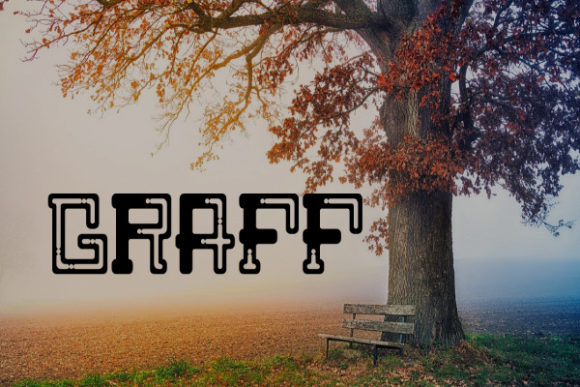
Graff is a display font that brings energy, character, and charm to any design project. Created by Rikyozone, this typeface stands out with its bold, playful curves and dynamic feel. It's not just another font—it’s a visual statement that can elevate branding, marketing materials, editorial layouts, and more. Whether you're a designer looking for the perfect headline or a blogger wanting to catch attention, Graff offers a fresh and versatile option that feels both modern and fun.
What Makes Graff Unique?
The appeal of Graff lies in its balance between whimsy and readability. While many display fonts lean too heavily into eccentricity and become hard to read, especially at smaller sizes, Graff maintains clarity while injecting personality. Its slightly irregular shapes and soft edges give it a hand-drawn aesthetic without sacrificing professionalism.
This font is ideal for projects where creativity and approachability are key. From logo designs to social media posts, Graff helps create an instant emotional connection with the viewer. It works particularly well in digital formats but also shines in print when used thoughtfully.
Design Elements That Define Graff
- Playful Curves: The sweeping lines and rounded forms make it visually inviting and easy on the eyes.
- High Contrast: Thick and thin strokes add depth and dimension, making it stand out even in minimalist compositions.
- Versatile Weight Options: Available in multiple weights allows for flexibility in hierarchy and emphasis.
- Distinct Character Shapes: Each letter has subtle quirks that make the font memorable and expressive.
Creative Uses for Graff
Font choice can dramatically shift the tone of a project. Graff is no exception. Here are some practical applications where it can truly shine:
Branding and Logo Design
For brands targeting younger audiences or those with a creative, artistic vibe, Graff adds a touch of flair. Consider using it for:
- Logo headlines to emphasize playfulness and innovation.
- Subtle taglines where a softer tone complements a bolder primary font.
- Iconic text elements in app interfaces or website headers.
Marketing Materials and Social Media
In today’s fast-paced digital world, first impressions matter. Graff can help your content stand out in crowded feeds.
- Email Headers: Use Graff to grab attention in subject lines or email greetings.
- Social Media Captions: Pair it with clean sans-serif body text for contrast and impact.
- Banner Ads: Its bold presence makes it perfect for short, punchy messages.
Editorial and Publishing
If you're working on magazines, zines, or online publications, Graff can serve as a great decorative element.
- Issue titles or section headers benefit from its eye-catching style.
- Quotes or pull-outs become more engaging when set in Graff.
- Use it sparingly for chapter headings or sidebars to break up dense text.
Adapting Graff for Different Audiences and Formats
One of the strengths of Graff is its adaptability across industries and mediums. However, the way you apply it may vary depending on your specific needs.
For Entrepreneurs and Small Business Owners
If you're building your brand identity, consider using Graff for:
- Business cards with a unique twist—especially for service-based businesses like cafes, art studios, or yoga retreats.
- Menu designs where a warm, friendly tone is desired.
- Event posters or promotional flyers for local happenings such as pop-up shops, workshops, or festivals.
For Bloggers and Content Creators
Bloggers often seek ways to differentiate their platforms. Graff can be used creatively for:
- Post titles or category labels to inject personality into your site layout.
- Introductory quotes or featured sections to highlight key points.
- YouTube thumbnails or podcast covers where visual appeal drives engagement.
For Educators and Hobbyists
Teachers and DIY enthusiasts can use Graff in educational materials or craft projects.
- Workshop Titles: Make learning sessions more inviting by using Graff for course names or activity titles.
- Handmade Invitations: Graff gives a personal touch to custom greeting cards, party invites, or event announcements.
- Infographics and Charts: When highlighting key data points or categories, Graff can make information more digestible and engaging.
Best Practices for Using Graff
To maximize the effectiveness of Graff, follow these guidelines to keep your designs clear and impactful:
Limit Usage to Key Visual Moments
As a display font, Graff isn’t intended for long blocks of text. Reserve it for headlines, subheadings, and accent text. Overuse can lead to fatigue and reduce the perceived importance of what matters most.
Balance with Complementary Fonts
Choose a secondary font that contrasts well with Graff—something simple and modern like Helvetica or Lato. This creates a visual rhythm that enhances readability and guides the user through your content seamlessly.
Test Across Devices and Platforms
Always preview how Graff appears on different screens. On mobile devices, ensure it scales appropriately and remains legible. For web use, consider how it loads and renders across browsers and operating systems.
Stay Consistent in Application
Consistency is crucial in design. Once you've chosen Graff for a specific purpose, stick to that usage throughout the project. This builds recognition and strengthens your visual language.
Real-World Examples of Graff in Action
Let’s look at how Graff could enhance real-world projects:
Example 1: A Yoga Studio Website
The studio name is displayed in Graff at the top of the homepage, immediately conveying a sense of calm and creativity. Below it, a call-to-action like “Find Your Flow” uses the same font to reinforce the theme. Body text is kept in a clean serif font to maintain a soothing atmosphere.
Example 2: A Food Blog Post
A post titled “Weekend Brunch Ideas You’ll Love” uses Graff for the header, drawing the reader in with its warm and inviting feel. Pull-out quotes about recipes or cooking tips are highlighted in Graff to emphasize their importance and make them easier to spot.
Example 3: A Children’s Book Cover
Graff is used for the title of a picture book aimed at young readers. The playful nature of the font aligns perfectly with the story’s themes of adventure and imagination. Supporting text like the author’s name and blurb are in a contrasting, highly readable font to avoid confusion.
Where to Find and Use Graff
Graff is available for purchase and download from Rikyozone’s official site. As a digital asset, it supports various file formats including TTF and OTF, ensuring compatibility with most design software and platforms.
Once installed, you can start experimenting. In Adobe Photoshop or Illustrator, Graff can be layered over textures or images for a dynamic effect. In Canva or Figma, it pairs well with bold colors and negative space to create striking visuals.
When sharing your work online, always confirm that the platform supports custom fonts. If not, export your text as an image or vector graphic to maintain the integrity of the design.
Conclusion
Graff is more than just a font—it’s a tool for expression. By understanding its strengths and limitations, you can harness its potential to bring creativity and clarity to your projects. Whether you’re designing for a business, crafting a personal blog, or planning a community event, Graff offers a fresh perspective that connects with your audience in meaningful ways.
Explore its possibilities, test its applications, and find the right balance between form and function. With thoughtful use, Graff can become a signature element in your creative toolkit—adding just the right amount of flair to make your work unforgettable.