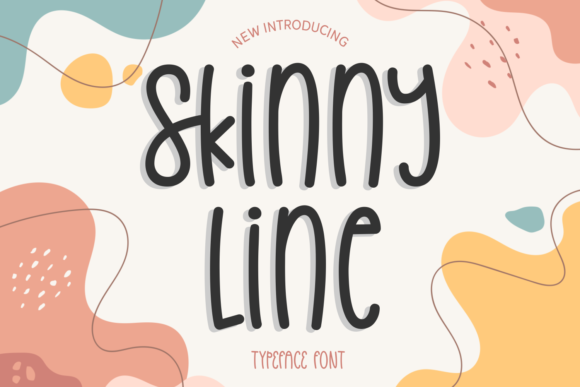
Skinny Line: A Delicate Display Font for Modern Designers
Fonts are the unsung heroes of design. They shape how messages are perceived, influence brand identity, and bring visual harmony to any project. When it comes to display fonts—those used for headlines, logos, or standout text—choosing the right one can make all the difference. One such font that has been gaining popularity among designers is Skinny Line. With its thin, elegant lines and a modern aesthetic, this font is ideal for creative projects like birthday cards, movie titles, quotes, personal branding, logos, covers, music visuals, and posters.
What Is Skinny Line?
Skinny Line is a display font characterized by its ultra-thin strokes and minimalistic structure. It belongs to the category of sans-serif fonts but takes the concept to an extreme with its delicate appearance. This font isn’t meant for body text; instead, it shines in situations where impact and style matter more than readability at smaller sizes.
Designers love Skinny Line because it adds a touch of sophistication and contemporary flair. Whether you’re working on a minimalist logo or designing a sleek poster for a new album launch, this font brings a sense of refinement without being over the top.
Why Choose Skinny Line?
- Visual Impact: The thin lines create a bold yet subtle contrast, especially when paired with thicker or bolder fonts in multi-layered designs.
- Versatility: Despite its slim profile, Skinny Line adapts well to various uses—from digital banners to print materials like business cards or invitations.
- Creativity Boost: Its unique look inspires fresh design ideas and allows for artistic expression in typography-heavy projects.
Common Mistakes When Using Skinny Line
While Skinny Line is visually appealing, using it incorrectly can lead to poor results. Here are some common pitfalls to avoid:
Using It for Body Text
One of the biggest mistakes is applying Skinny Line to long paragraphs or body copy. Thin fonts tend to lose clarity when scaled down or used extensively. This can cause eye strain and reduce the overall readability of your content.
Better approach: Reserve Skinny Line for short phrases, headings, or accents. For body text, choose a more legible typeface like Lato, Open Sans, or Montserrat.
Ignoring Background Contrast
The fine details in Skinny Line require sufficient contrast against the background to remain visible. If placed on a busy or dark background without proper spacing or color differentiation, the font can appear washed out or even illegible.
Better approach: Always test your text against different backgrounds. Use high-contrast colors (like white text on black) or ensure there’s enough space between the font and surrounding elements to maintain legibility.
Overlooking Kerning and Spacing
Thin fonts are more sensitive to spacing issues. Poor kerning (the space between letters) or tracking (space across a whole block of text) can make the font look disjointed or unbalanced.
Better approach: Adjust the spacing manually if needed. Most design tools like Adobe Photoshop, Illustrator, or Canva allow you to tweak these settings. Take time to review how each character sits next to the others for a polished finish.
Choosing the Right Format for Your Project
When you download or buy Skinny Line, it’s important to consider the file format. Different platforms support various types of font files, so selecting the correct one ensures compatibility and performance.
Web projects: Opt for WOFF or WOFF2 formats for better browser support and faster loading times.
Print materials: TTF or OTF files are preferred for their scalability and precision in printed form.
Mobile apps or video editing: Make sure to check if the platform supports variable fonts or requires specific licensing for redistribution.
Always Check Licensing Terms
A surprising number of users overlook the licensing agreement when downloading free or paid fonts. Some fonts are only available for personal use, while others require a commercial license for logos, websites, or marketing materials.
Better approach: Before finalizing your design, read the font’s license carefully. Look for terms like “personal use,” “commercial use,” and “redistribution.” If you're unsure, contact the font creator or purchase a verified commercial license to avoid legal issues later.
Pairing Fonts Effectively
Typography is about balance. Pairing Skinny Line with another font can enhance its appeal, but doing it wrong can clash and confuse the viewer.
- Stick to complementary styles: Match Skinny Line with a medium or bold sans-serif or serif font to create contrast and hierarchy. For example, pairing it with Bebas Neue or Raleway works well for modern looks.
- Use it as an accent: Don’t let it overpower the rest of your design. Let it play a supporting role in secondary text or taglines.
- Maintain visual rhythm: Ensure that the size, weight, and spacing of both fonts work together to guide the reader's eye smoothly through the layout.
Real-World Applications of Skinny Line
To help you visualize how Skinny Line can be used effectively, here are some practical examples:
- Birthday Cards: Use Skinny Line for the celebratory headline, then pair it with a rounded font like Quicksand for the message to add warmth.
- Movie Posters: Combine it with a strong title font like Impact or Bangers for dramatic effect. Add subtle shadows or outlines to improve visibility.
- Personal Branding: Ideal for signature-style logos or social media headers. Just remember to keep the design simple and avoid clutter.
- Quotes and Covers: Great for highlighting inspirational quotes or book/album covers. Place the text centrally with ample padding to emphasize the font’s elegance.
How to Download and Evaluate Skinny Line
Before committing to Skinny Line, take a few moments to evaluate it properly:
Preview it first: Many font marketplaces offer web-based previews. Type out your actual text to see how it looks in context. Avoid choosing based on just one sample word.
Test at different sizes: Try scaling the font up and down. Does it hold up at 48pt? What about 16pt? This will give you a sense of its versatility.
Check character set: Make sure it includes all the characters you need, including special symbols, accents, and ligatures. Missing glyphs can disrupt the flow of your design.
Final Tips for Maximum Impact
Here are a few final pieces of advice to get the most out of Skinny Line:
- Don’t go too small: The thinner the stroke, the less forgiving it is at lower sizes. Keep the text large enough to retain its beauty and clarity.
- Limit usage: Overusing Skinny Line can dilute its effect. Use it sparingly to highlight key phrases or areas.
- Consider accessibility: While aesthetics are important, always ensure that your design is accessible. Thin fonts may not pass certain accessibility standards when used alone for critical information.
By understanding the strengths and limitations of Skinny Line, you can harness its potential to elevate your designs. Whether you're a seasoned professional or just starting out, thoughtful typography choices will help you stand out and communicate effectively with your audience.